If your unit cannot reach the Pulse-Eight cloud, firmware can be applied locally using the Pulse-Eight Discovery Tool and a firmware file provided by support.
Your unit must be on firmware 3.9.12 or newer before the offline update option is available. If your unit is on an older firmware version, you will need to perform one online update to reach 3.9.12 before this process can be used. Contact support if you are unable to do this.
Before You Start
You will need two things before proceeding:
- The firmware file (.p8b) — contact support@pulse-eight.com with your unit's serial number and the team will provide the correct file.
- The Pulse-Eight Discovery Tool — available as an attachment at the bottom of this article if not already installed.
Update Process
1
Launch the Discovery ToolDouble-click
PulseEight.DiscoveryTool.exe and wait for your unit to be detected on the network.2
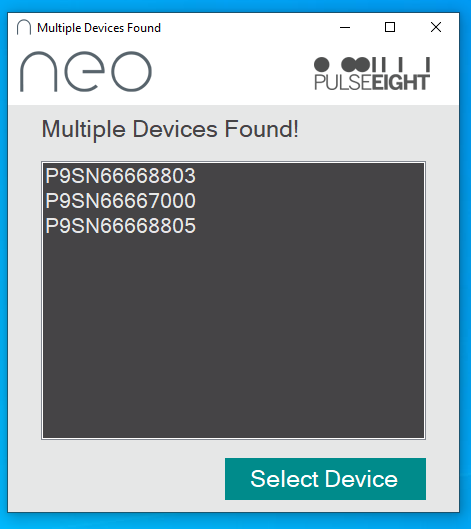
Select your unit (if prompted)If multiple units are found on the network, a popup will appear asking you to select the correct device.
3
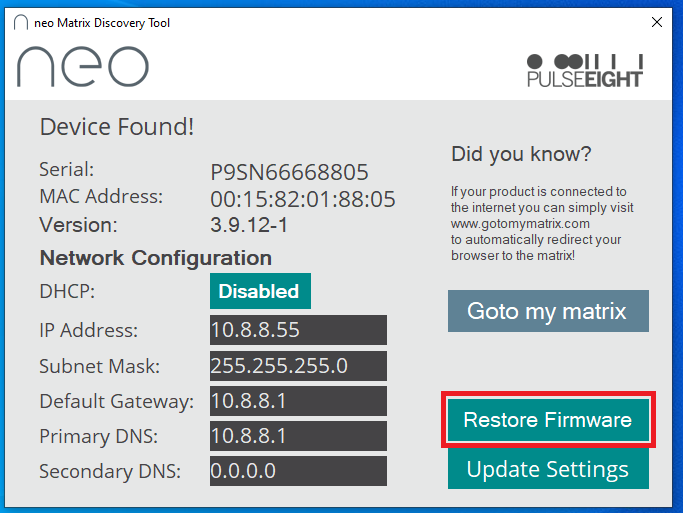
Click Restore FirmwareThis button appears in the main window once a compatible unit is detected. If the button is not visible, the unit is either running a firmware older than 3.9.12 or is in bootloader mode — contact support before proceeding.
4
Select the firmware fileIn the new window that opens, clickSelect Fileand browse to the
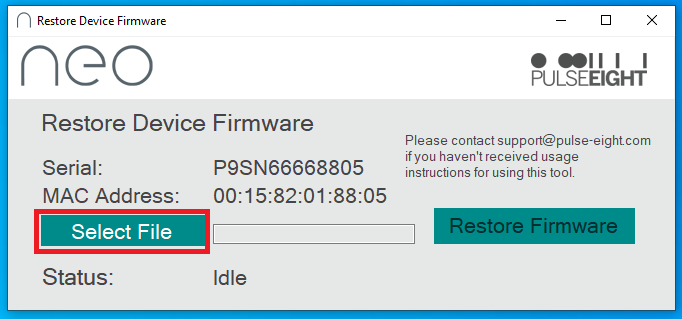
.p8b file provided by support. 5
Apply the firmwareClickRestore Firmwareand wait for the process to complete. This can take up to 5 minutes. The tool will show upload progress, then installation progress — the unit will not respond to pings while writing to flash memory. Do not power off the unit or disconnect it from the network during this process.
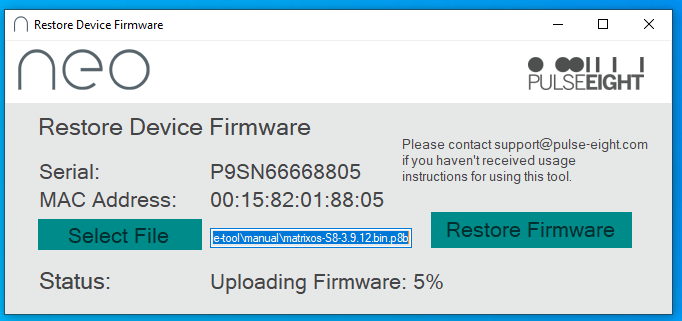
The tool will confirm completion once the unit responds to pings and API commands again.
The tool will confirm completion once the unit responds to pings and API commands again.
6
Confirm the updateThe new firmware version will appear in the Status line and main window once the upgrade has completed successfully. If it does not, check
/system/errorlog for details or contact support.Related Articles
Need a firmware file or help with this process?
Contact support with your unit's serial number and we'll provide the correct firmware.
UK: 01202 413 610 | US: (858) 748-8250 | support@pulse-eight.com
Contact support with your unit's serial number and we'll provide the correct firmware.
UK: 01202 413 610 | US: (858) 748-8250 | support@pulse-eight.com