If your Pulse-Eight Neo Matrix or ProAmp is not connecting to the cloud, follow the steps below to identify the cause.
This article covers the Neo Matrix and ProAmp ranges only. ProAudio products do not use cloud monitoring and are not in scope here.
Troubleshooting Steps
1
Confirm there is a stable internet connection on siteThe unit must be able to reach the internet to communicate with the Pulse-Eight cloud server. Verify that other devices on the same network have internet access before proceeding.
2
Check that port 80 is not being blockedThe unit communicates with the Pulse-Eight cloud overport 80 (HTTP). If a firewall is blocking outbound connections on this port, the unit will not connect.
To test this, open a Command Prompt on a PC connected to the same network and run:
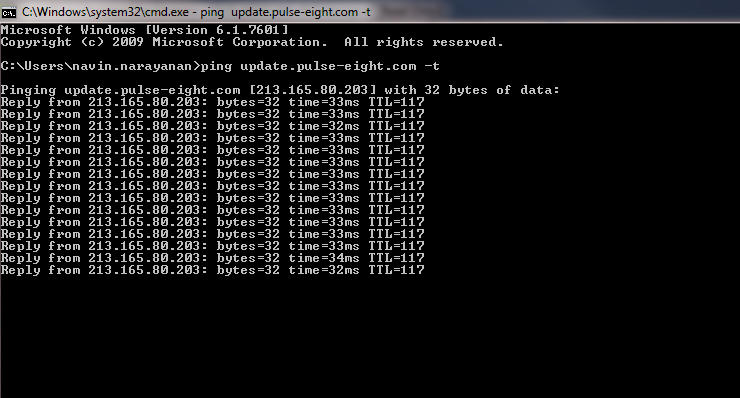
If you do not receive replies, the connection is being blocked at the network level. Whitelist
To test this, open a Command Prompt on a PC connected to the same network and run:
ping update.pulse-eight.com -tIf you receive replies, the network can reach the Pulse-Eight server and port 80 is not blocked.
If you do not receive replies, the connection is being blocked at the network level. Whitelist
update.pulse-eight.com on port 80 to resolve this.3
Check for an IP address conflictAnother device on the network may be using the same IP address as the unit, preventing it from communicating correctly.
To check, open a Command Prompt on a PC on the same network and run:
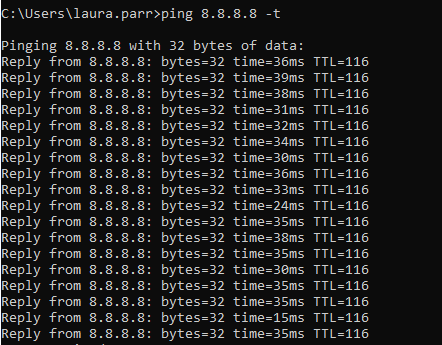
To check, open a Command Prompt on a PC on the same network and run:
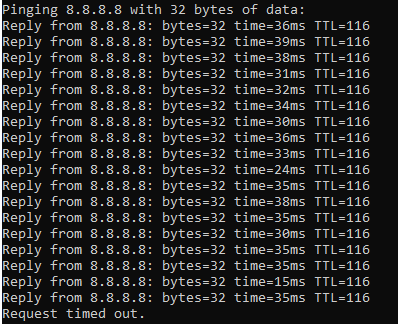
ping [unit's IP address]If you receive replies when the unit is powered off, another device is using that IP. Resolve the conflict either by assigning the unit a different IP, or by reserving its address in the router's DHCP settings.
If there is no IP Clash the response will look similar to the screenshot below:
4
If using a static IP addressIn addition to the steps above, confirm the following:
- The static IP assigned to the unit is within the router's reserved range, so the router does not assign a conflicting address via DHCP.
- The correct gateway and DNS addresses have been entered in the unit's network settings.
Still Not Connecting?
If the unit cannot reach the cloud after completing all steps above, firmware can be applied offline as an alternative to waiting for a cloud update. See Updating Pulse-Eight Video Matrix or ProAmp Firmware Offline.
Do not attempt an offline firmware update without confirming the correct firmware version for your unit. Applying the wrong firmware may cause further issues. Contact support if you are unsure.
Related Articles
- How to Change IP Address in a ProAmp8 or Pulse-Eight Video Matrix
- Updating Pulse-Eight Video Matrix or ProAmp Firmware Offline
- How to Update Neo Matrix and ProAmp Firmware
- Cloud Monitoring – How to Use
Still having trouble connecting?
Raise a support ticket and our team will help diagnose the issue.
UK: 01202 413 610 | US: (858) 748-8250 | support@pulse-eight.com
Raise a support ticket and our team will help diagnose the issue.
UK: 01202 413 610 | US: (858) 748-8250 | support@pulse-eight.com