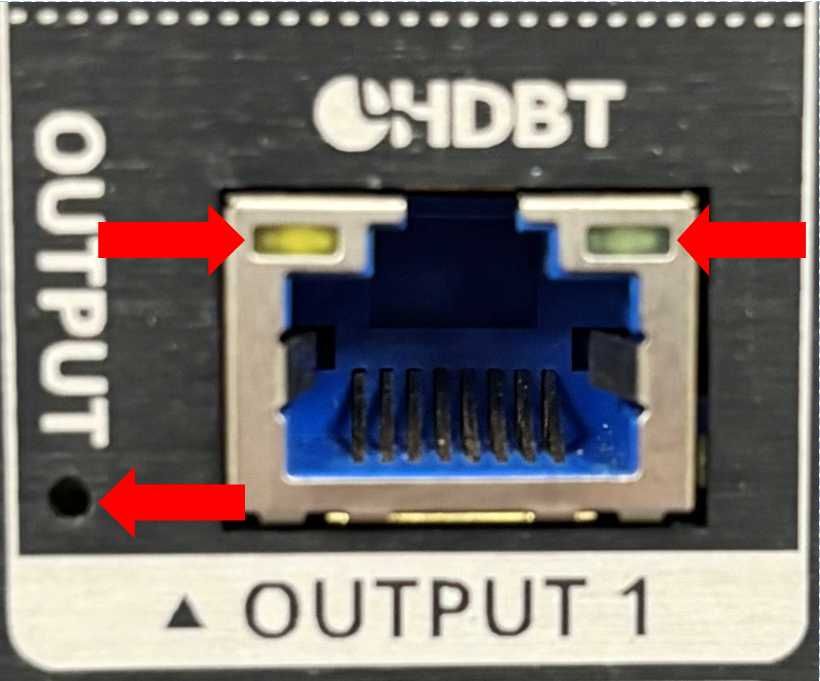
Power LED (Bottom Left)
Green: Port has power
Off: Port does not have power.
If you are unable to light the green power LED on the bottom left this could be because of a few reasons.
- Ensure that the HDMI output cable is connected both on the matrix and on the receiver and that they have been pushed in correctly. The power light requires correct feedback via the cat cable to turn on.
- On the RJ45 plug pins 1,2,3 and 6 are required to be connected correctly to pass the power. Perform a continuity test on the cables and ensure they are using RJ45-568b wiring on their cable ends.
- Note: that this LED should not be taken as proof that the wire is in spec or meets bandwidth requirements or even that it is in the correct order, it will only demonstrate that pins 1,2,3 and 6 have connection.
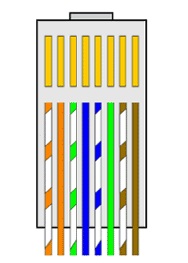
- Note: that this LED should not be taken as proof that the wire is in spec or meets bandwidth requirements or even that it is in the correct order, it will only demonstrate that pins 1,2,3 and 6 have connection.
- Check the HDBaseT output port on the matrix/transmitter and HDBaseT input port on the receiver for damage to the pins
Amber LED (Left)
Off - No HDBT Link
Amber - HDBT Link Established
Green LED (Right)
Off- No Video
Green (Blink) - Video Present (No HDCP)
Green (Solid) - Video Present (No HDCP)
If you are seeing a link and video LED the matrix should be functioning correctly.
If you are seeing link and no video check you're routing the video correctly and that the input is functioning and that your output device is powered on. Change your HDMI cable if all these appear to be correct.
LED states on the receiver
Ultra Receiver and Pro Receiver
Amber LED (Left)
Off - No HDBT Link
Amber - HDBT Link Established
Green LED (Right)
Off- No Video
Green (Blink) - Video Present (No HDCP)
Green (Solid) - Video Present (No HDCP)
If you are seeing a link and video LED this should be functioning correctly.
If you are seeing link and no video check you're routing the video correctly and that the input is functioning and that your output device is powered on. Change your HDMI cable if all these appear to be correct.
Lite Receiver
Amber LED (Left)
Off - No HDBT Link
Amber - HDBT Link Established (this should always be amber if you have amber on the matrix)
Green LED (Right)
Off- No Video
Green - Powered
If you are seeing a link and power LED this should be generating a Link Quality Graph on the System Health Tab.
If you do not have power here and you do have power on the matrix port then swap the receiver with a known working one and see if the issue resolves. If issue remains on this line check cable length and investigate PoE issue.