This article describes the cable harness supplied with the Intel NUC HDMI-CEC Adapter for 6th, 7th, and 8th generation Intel NUC systems. It covers the harness layout and how to connect each sub-connector to the correct header on your NUC motherboard.
The Harness
The harness has a single base connector that plugs into the CEC adapter PCB, splitting into two 4-pin sub-connectors that each connect to a different header on the NUC motherboard.
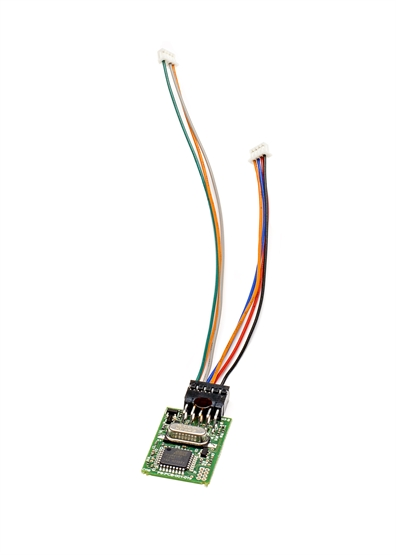
The 6th/7th/8th gen cable harness. Left sub-connector goes to the USB header (X). Right sub-connector goes to the CEC header (P or N).
Connecting the Harness
Both sub-connectors connect to headers on the top side of the NUC motherboard. To access them, remove the base plate of the NUC — you do not need to remove the motherboard itself from the chassis.
Left sub-connector — USB header (marked X)
The left sub-connector plugs into the internal USB 2.0 header on the motherboard, which is labelled X on the board silk-screen. This header provides the USB data connection the adapter uses to communicate with the host system.
Right sub-connector — CEC header (marked P or N)
The right sub-connector carries the CEC signal, 5V standby, and power switch. It plugs into the dedicated CEC header on the motherboard, labelled P or N depending on the board revision.
The CEC header pinout (Molex 53398-0471, 1.25mm pitch, 4 circuits) as documented in Intel's NUC Technical Product Specifications:
| Pin | Signal |
|---|---|
| 1 | 5V Standby |
| 2 | GND |
| 3 | PWR Switch |
| 4 | HDMI CEC |
PCB Placement
Once both sub-connectors are seated, fix the CEC adapter PCB inside the chassis using the supplied double-sided foam pad. The suggested location is between the WiFi mPCI board and the memory modules.
Compatible NUC Models
This harness is supplied with the Intel NUC HDMI-CEC Adapter (P8-NUCCECv1) when ordered for the following NUC models.
8th Generation
- NUC8i7BEH
- NUC8i5BEH
- NUC8i5BEK
- NUC8i3BEH
- NUC8i3BEK
- NUC8i3CYS
7th Generation
- NUC7CJYH
- NUC7PJYH
- NUC7CJYSAL
- NUC7CJYB
- NUC7i7DNKE
- NUC7i7DNHE
- NUC7i7DNBE
- NUC7i5DNKE
- NUC7i5DNHE
- NUC7i5DNBE
- NUC7i3DNKE
- NUC7i3DNHE
- NUC7i3DNBE
- NUC7i7BNH
- NUC7i7BNHX1
- NUC7i7BNHXG
- NUC7i7BNKQ
- NUC7i5BNH
- NUC7i5BNHX1
- NUC7i5BNHXF
- NUC7i5BNK
- NUC7i5BNKP
- NUC7i7BNB
- NUC7i5BNB
- NUC7i3BNK
- NUC7i3BNH
- NUC7i3BNHX1
- NUC7i3BNHXF
- NUC7i3BNB
6th Generation
- NUC6CAYS
- NUC6CAYH
- NUC6CAYB
- NUC6i5SYH
- NUC6i5SYK
- NUC6i3SYH
- NUC6i3SYK
- NUC6i5SYB
- NUC6i3SYB
Related Articles
- Intel NUC HDMI-CEC Adapter — Installation Guide
- 4th Gen cable harness for NUC HDMI-CEC Adapter
- 5th Gen cable harness for NUC HDMI-CEC Adapter
- Hades Canyon NUC CEC Adapter Instructions
- Upgrading the firmware of the CEC adapter
Our support team is happy to assist. Get in touch and have your NUC model number ready.
UK: 01202 413 610 | US: (858) 748-8250 | support@pulse-eight.com