If your cec-client batch scripts appear to do nothing — even though CEC is clearly working through CEC-Tray — the cause is almost always that CEC-Tray already has exclusive use of the adapter.
cec-client cannot connect to the adapter and will fail silently.Why this happens
The USB-CEC adapter can only be held by one process at a time. CEC-Tray opens a connection to the adapter when it starts and keeps it open continuously. When a batch script calls cec-client -s, it attempts to open the same adapter and fails to connect — but produces no visible error, so the script appears to run successfully while doing nothing.
Fix: close CEC-Tray before running batch commands
Open CEC-Tray, then go to
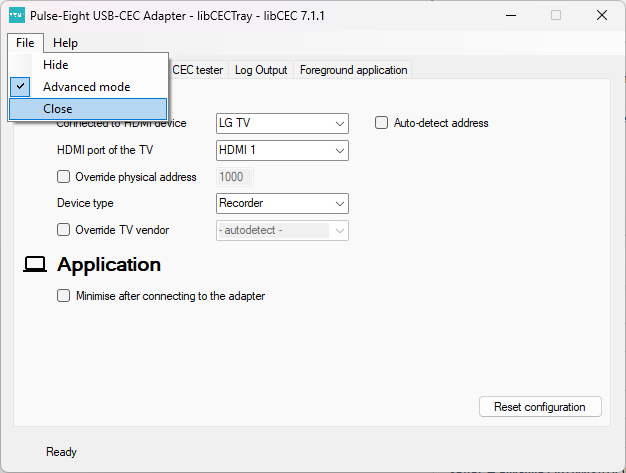
 .
.With CEC-Tray closed, CEC-Client can now connect to the adapter. Your script should execute as expected.
If the script still fails, check that cec-client.exe is accessible. Use the full path to be certain:
"C:\Program Files\Pulse-Eight\USB-CEC Adapter\cec-client.exe" -s
so the full command paths to use when editing
Tv_on
@echo off
echo as | "C:\Program Files\Pulse-Eight\USB-CEC Adapter\cec-client.exe" -s
Tv_off
@echo off
   echo standby 0 | "C:\Program Files\Pulse-Eight\USB-CEC Adapter\cec-client.exe" -s
Common batch command reference
The correct syntax for single-command scripts using the -s flag is to pipe the command into cec-client:
Turn TV off (standby)
@echo off echo standby 0 | cec-client -s
Turn TV on (active source)
@echo off echo as | cec-client -s
0 is the TV's logical CEC address. Use F for broadcast (all devices). You can confirm addresses on the CEC bus using the CEC tester tab in CEC-Tray while it is running.Understanding standby and PC sleep
If you find your PC goes to sleep when sending a standby command to the TV, this is a separate but related behaviour. When the TV receives a standby command it sends a broadcast standby back onto the CEC bus. If CEC-Tray is configured to put the PC to sleep when it receives a standby signal, this echo from the TV will trigger it.
| Target address | What happens | PC affected? |
|---|---|---|
0 — TV | Standby sent to TV. TV may echo a broadcast standby back onto the bus. | Possibly, via TV echo |
F — Broadcast | Standby sent to all devices on the CEC bus. | Yes, by design |
1 — Recorder (PC) | Standby sent only to the PC's own logical address. No TV echo. | Yes, directly |
To prevent the PC sleeping when scripts send a TV standby, disable Power off on standby in the CEC-Tray Configuration tab.
Related articles
- Getting Started — CEC Adapter
- Which TV Power Control Method Should I Use?
- What is the Pulse-Eight CEC Adapter and libcec?
- CEC Adapter — Waking the TV When PC Resumes from Sleep
Our support team can help diagnose adapter connectivity and CEC bus issues.
UK: 01202 413 610 | US: (858) 748-8250 | support@pulse-eight.com