Extended I/O mode standardizes source numbering across the entire ProAudio range, this is used in some control systems so that a single driver can be written to work with any model without remapping sources for each one.
without it, a driver has to know the exact analog/coax/optical input count of the specific model it's talking to — a driver built around a ProAudio32 won't correctly address inputs on a ProAudio8, ProAudio16, or ProAudio1632, since each model numbers its sources differently by default.
Extended I/O mode gives every model in the range the same universal routing structure for analog, optical, and coax sources, so one driver can be built once and work correctly across the whole ProAudio line, rather than needing a separate version per model.
What is Extended I/O mode?
By default, each switch numbers its sources based on its own specific mix of analog, coax, and optical inputs — a driver written for one model has to remap sources to work on another. Extended I/O mode makes every switch in the range use the same source numbering, removing that need.
How do I enable Extended I/O mode?
^XS +32768$ ; set the XIO flag to use extended I/O mappings^SS 8$ ; save the XS settings to EEPROM (optional)
+ prefix on the XS command sets only the bit given (in this case, XIO) without touching any other control settings. Use ^XS ?$ to check the switch's current settings at any time.What happens if I set a zone to a source that doesn't exist?
The zone mutes. This is equivalent to setting it to source 0.
What are the source mappings for analog audio zones?
| Source | Description |
|---|---|
| 0 | Disconnect zone from any source |
| 1–32 | Analog audio from RCA left/right inputs |
| 33–64 | PCM-stereo audio from Coax inputs (mutes if Dolby 5.1 or DTS) |
| 65–80 | PCM-stereo audio from Optical inputs (mutes if Dolby 5.1 or DTS) |
What are the source mappings for digital audio zones?
| Source | Description |
|---|---|
| 0 | Disconnect zone from any source |
| 1–32 | Reserved (muted) |
| 33–64 | PCM-stereo, Dolby 5.1, or DTS from Coax inputs |
| 65–80 | PCM-stereo, Dolby 5.1, or DTS from Optical inputs |
| 129–144 | PCM-stereo mirroring the 16 analog outputs of the same audio card |
Can Dolby 5.1 or DTS audio be down-converted to analog?
No — only PCM-stereo audio can be down-converted to analog.
What does the "SS" command do?
It saves the switch's current settings — including the Extended I/O setting — to EEPROM, so they persist through power cycles.
Do I need to send the "XS" command every time I power on the switch?
Only if you haven't already saved the setting to EEPROM with the SS command.
Enabling Extended I/O Mode With the Config Tool
Open the Config Tool, select your switch, and go to the Advanced tab. Each flag here shows its current state as descriptive text next to its toggle, with the underlying flag name (XIO, CRE, ECO, etc.) labelled above it.
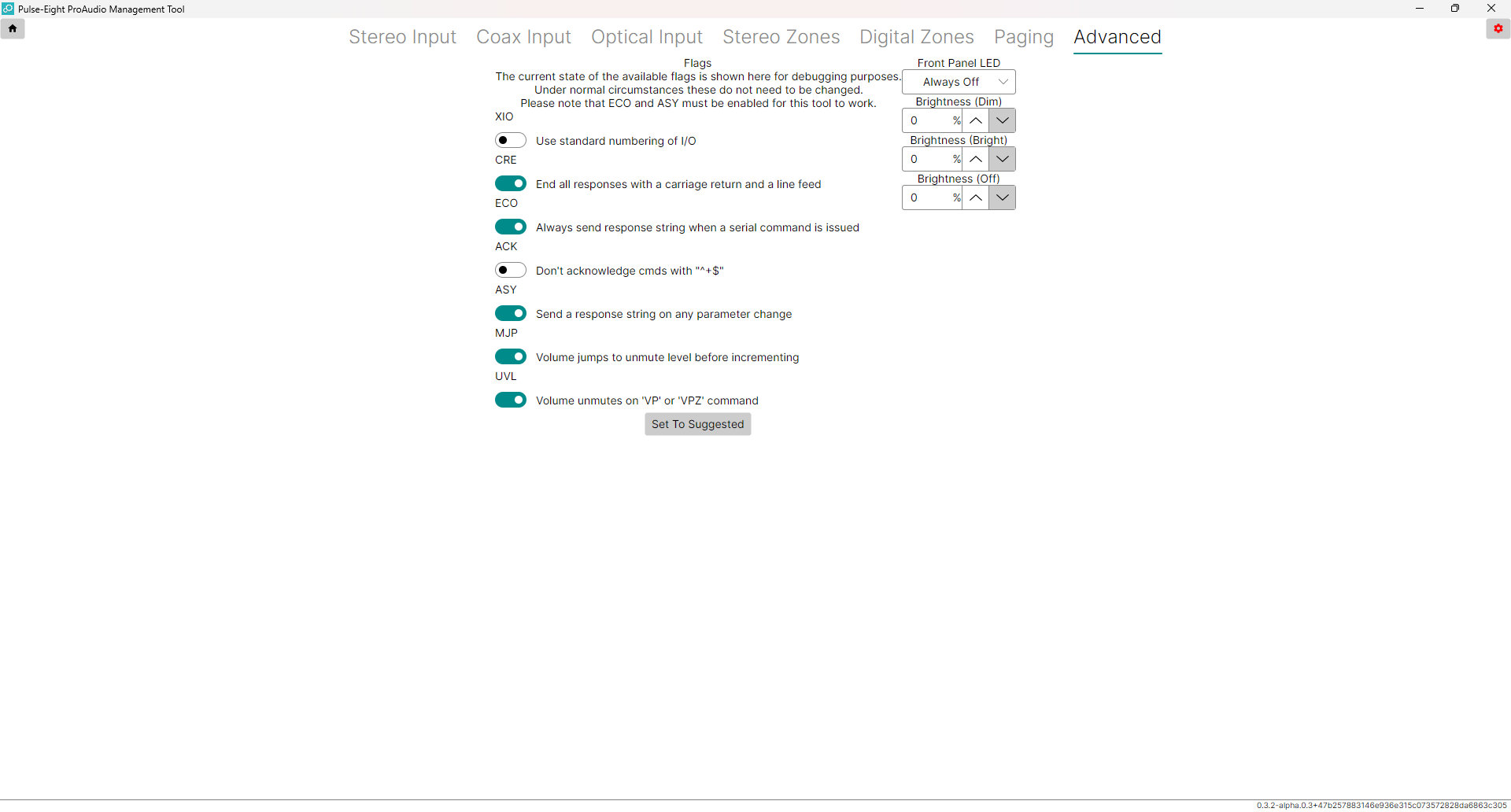
Turn the XIO toggle on. Its label will switch from "Use standard numbering of I/O" to reflect extended numbering being active.
^SS 8$).Tick Control settings (XS) on the zone parameters panel and click Save Selected to make the change survive a power cycle.
Related Articles
- ProAudio Config Tool Overview — full reference for the Config Tool interface
- ProAudio Gain Staging — essential reading before any other configuration
- ProAudio Range — Which Model Do I Need?
- ProAudio Digital Zones — configuring digital (coax/optical) zone outputs
- ProAudio Paging Setup
Have the ProAudio model, serial number, Config Tool version, and a description of the issue ready when you call.
UK: 01202 413 610 | US: (858) 748-8250 | support@pulse-eight.com