Before an RMA can be raised for all ProAudio Matrices, the internal fuse needs to be checked. In many cases a blown fuse is the actual cause of the unit not powering on, and it's simple to inspect yourself.
No tools are needed beyond possibly a flat-head screwdriver to open the fuse holder — the fuse is a standard glass type.
Step 1 — Locate the Fuse
The fuse is located on the rear panel, next to the power switch and IEC power inlet.
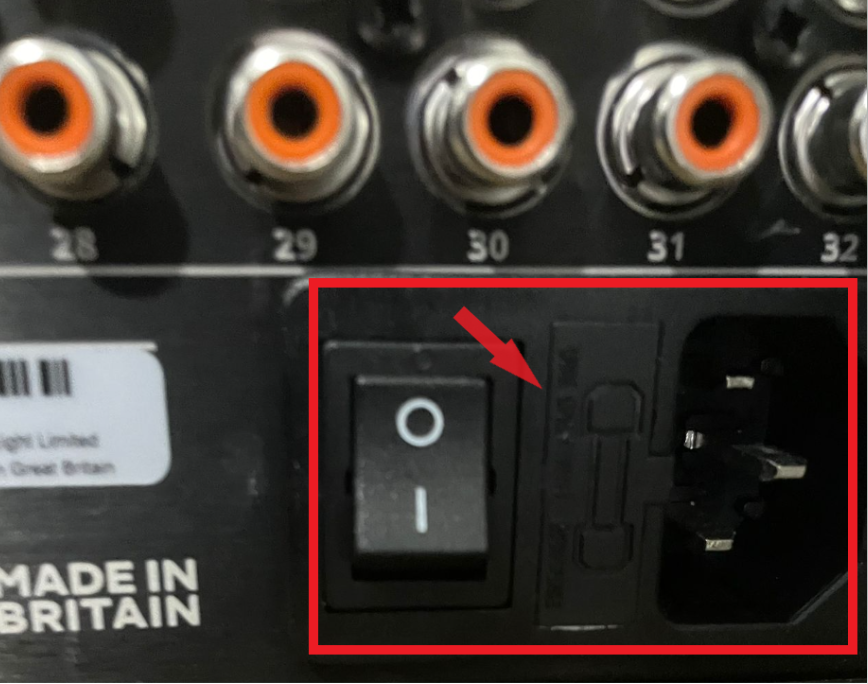
Step 2 — Check the Fuse
1
Open the fuse holderUse a flat-head screwdriver if needed to release the fuse holder from the IEC inlet housing.2
Inspect the fuse visuallyBecause it's a glass fuse, you can check it by eye — no meter required.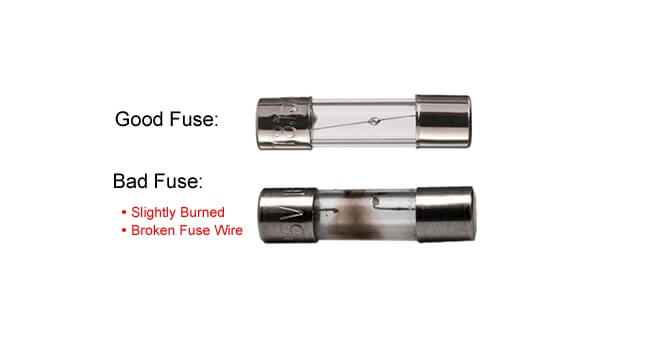
| Condition | What You'll See |
|---|---|
| ✗ Blown | Break in the wire, often with scorch marks or smoke residue inside the glass |
| ✓ Good | No smoke marks inside the glass, single unbroken wire running across |