The USB-CEC Adapter or Intel NUC CEC Adapter can be used to power off your TV automatically when your PC becomes inactive, and power it back on when activity resumes — effectively a screensaver for the display itself.
Steps
1
Install libCEC 8.1.1.Download and run libcec-x64-8.1.1.exe2
Open cec-tray.Click the Windows icon, type cec-tray, and start it.3
Go to the Power Control tab and set a delay.Under the Screensaver section, choose how long the PC needs to be inactive before the TV powers off — 2 minutes in the example below.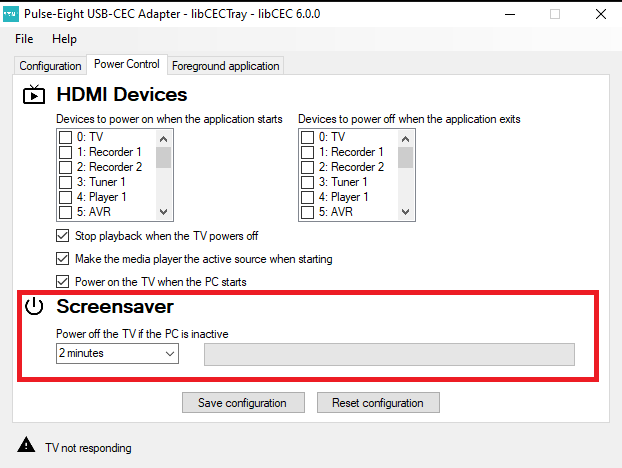
Once set, the TV will power off after the PC has been inactive for the selected delay, and power back on as soon as activity is detected.
The progress bar next to the delay dropdown shows how long the PC has been inactive. It fills to 100% at the point the TV powers off, and resets to 0% whenever activity is detected.
Related Articles
Need help setting this up?
Get in touch and we'll help you get it configured.
UK: 01202 413 610 | US: (858) 748-8250 | support@pulse-eight.com